Press kit
Writing about scam links, or adding Peekray to a list of tools? Everything you need is on this page: descriptions you can paste as they are, what Peekray is for and what it isn’t, key facts, pictures, and who to ask.
Updated
- Name
- Peekray (one word)
- Chrome listing
- Peekray: Scam Link Checker – Shows Where a Link Really Goes
- Edge listing
- Peekray: Scam Link Checker
- Former name
- LinkGuard, until October 2026
- Made by
- Avinash Jetwani, an independent developer in the UK
- Price
- Free, with no account and no ads
Describe Peekray
Paste any of these as they are. Each one is checked against how Peekray works today.
In one line
Peekray is a free Chrome and Edge extension that shows where a link really goes and warns you before you open phishing and scam links.
For a list of tools
Peekray (free, no account): a Chrome and Edge extension that shows where a link really goes when you rest the pointer on it. It follows short links and redirects, checks them against the OpenPhish, PhishTank and URLhaus lists, and asks Jev, TypeSafe AI’s decision model, about links no list knows yet, then gives a plain answer such as Safe, Check first, Suspicious or Scam. On a phone, paste a message at peekray.com/share.
Longer
Peekray (called LinkGuard until October 2026) is a free Chrome and Edge extension and website that checks links before you click them. It follows short links and redirects to the real destination, looks the link up in three public phishing and malware lists (OpenPhish, PhishTank and URLhaus), and asks Jev, TypeSafe AI’s decision model, about links no list knows yet. Each link gets a clear answer such as Safe, Check first, Suspicious or Scam, and the extension asks before opening a likely scam. On the website, and in the extension’s toolbar popup from version 1.7.1, a deep check can then read the page the link lands on (on Peekray’s server, never in your browser), check the site’s certificate, hosting and records, and ask Jev again, with every reason labelled by where it came from. On a phone, you can paste a whole message, share one on Android, choose a screenshot of one or scan a QR code, and it checks the links in it. There is no account and nothing to pay.
What it’s for, and what it isn’t
Best for
- Seeing where a link really goes, short links included, before you click it.
- One plain answer, such as Safe, Check first, Suspicious or Scam, with the reasons in everyday words.
- Checking the links in a text, WhatsApp message or email on a phone, by pasting it.
- Asking before a likely scam page opens, and saying what to do if you already clicked.
Not built for
- Scanning files or downloads: Peekray checks links, not files.
- Replacing antivirus or your browser’s own protection: keep those switched on, and Peekray works alongside them.
- Firefox and Safari: the extension is for Chrome and Edge, and browsers built on Chrome that install from the Chrome Web Store, like Brave. On a phone or in any other browser, use the checker on peekray.com.
Price and limits
There is no paid plan, and no company pays to be mentioned in the guides. To keep it free for everyone, each internet connection has a fair-use limit: only so many checks in a few seconds, and so many deep checks a minute and a day. Once a connection has used its daily share of Jev checks, it gets the rule-based quick check until midnight UTC. If the day’s Jev checks for everyone run out, every check gets the quick check until midnight UTC.
Key facts
- Free, with no account. The extension works in Chrome and Microsoft Edge, from the Chrome Web Store and Microsoft Edge Add-ons.
- Made by Avinash Jetwani, an independent developer in the UK (peekray.com/about). The guides are drafted and fact-checked with the help of AI, against the sources each one lists.
- On a phone, paste a text, email or link into the website, share it to Peekray on Android, choose a screenshot of it, or scan a QR code, and it checks the links in it (up to 8). When it checks a whole message, a screenshot or a QR code, only the web addresses in it are sent, and a screenshot is read on the phone.
- Most checks finish in under a second, start to finish: in 40 live checks from London on 28 September 2026, 37 took under a second (median 0.56 s).
- Its rule-based quick check was tested on more than 70,000 real phishing links from the PhiUSIIL research dataset.
- Threat lists: OpenPhish, PhishTank and URLhaus, kept on Peekray’s server and refreshed about hourly while in use, so lookups never go to the list providers.
- Sends nothing from the page but the link you hover, focus or click, that link’s text and the page title (with email addresses and long numbers removed). Never reads passwords, form fields or cookies.
- A deep check, on the website or in the extension’s toolbar popup (from version 1.7.1) and only when you ask for it, reads up to 512 KB of the page a link lands on, on Peekray’s server, without running its scripts. A page built by scripts that shows nothing, or almost nothing, without them may be opened once more in a locked-down browser on a separate, throwaway machine. Nothing is typed or clicked, no forms are filled in or sent and nothing is downloaded. Peekray’s server keeps what it found (a sign-in form, a brand name, a certificate’s age) for an hour and never the page’s text; the extension keeps the answer and its evidence lines until you close the browser.
- From extension 1.7.0, a password, card or one-time-code field on a page that presents itself as a brand Peekray knows, on an address that brand doesn’t own, gets a warning before you type. That check runs in your browser: it reads what the page says about itself and what its fields ask for, never what you type, and sends nothing.
How Peekray handles what it’s sent is in the privacy policy, and who makes it and how the guides are checked is on the About page.
Numbers you can quote
Phishing link statistics counts the public OpenPhish and PhishTank lists every day: how many scam links use https, sit on a platform anyone can sign up to, or name a brand. Each finding comes with the day it was counted, the page gives a ready-made quote, and the last 400 days’ numbers stay in a public data file, so a number you quote can be checked later.
Link check statistics adds up the links checked with Peekray, day by day: how many came back Safe, Check first, Suspicious or Scam, week by week, and how often links checked on the website were flagged next to links the extension checked. It counts whole days only, so the numbers move on once a day, and the data file has every day of the last year.
Pictures and logos
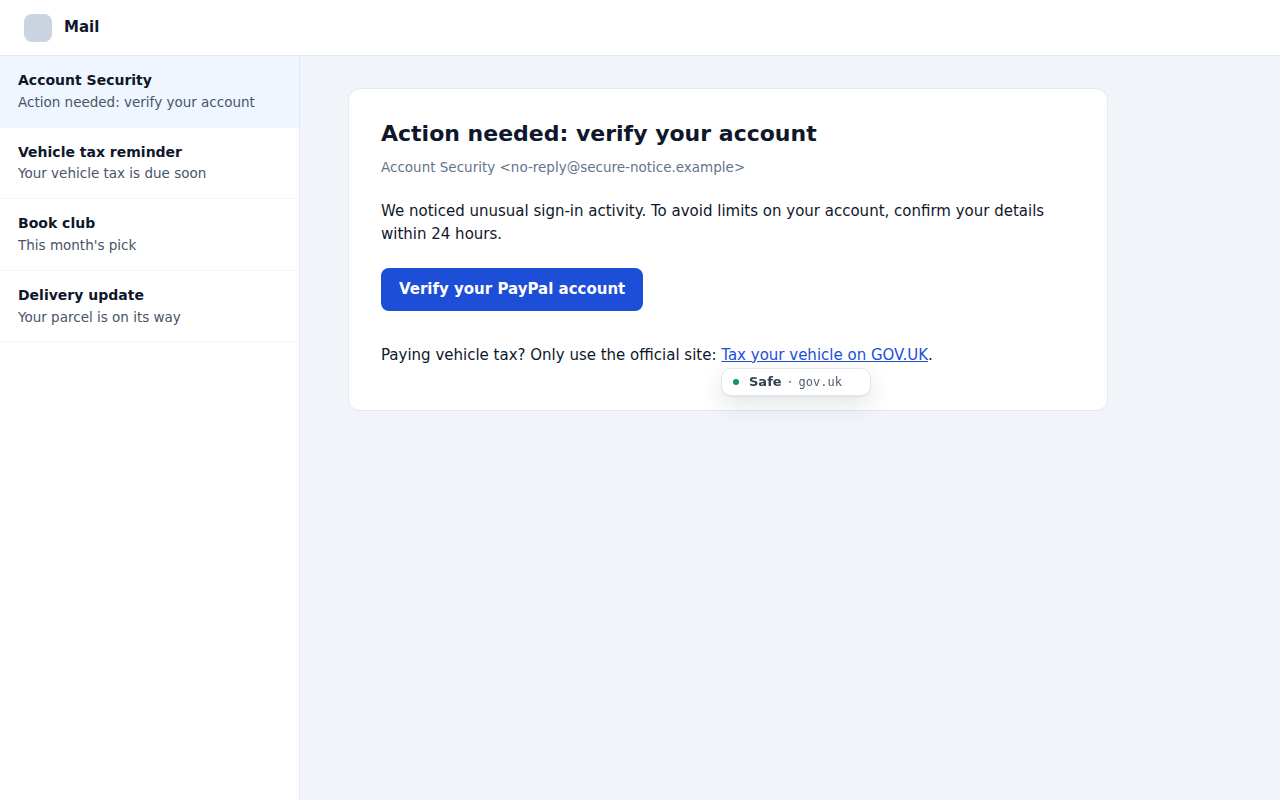
Rest the pointer on a link and the tag shows where it really goes, with the answer. Full size: 1280 × 800 PNG
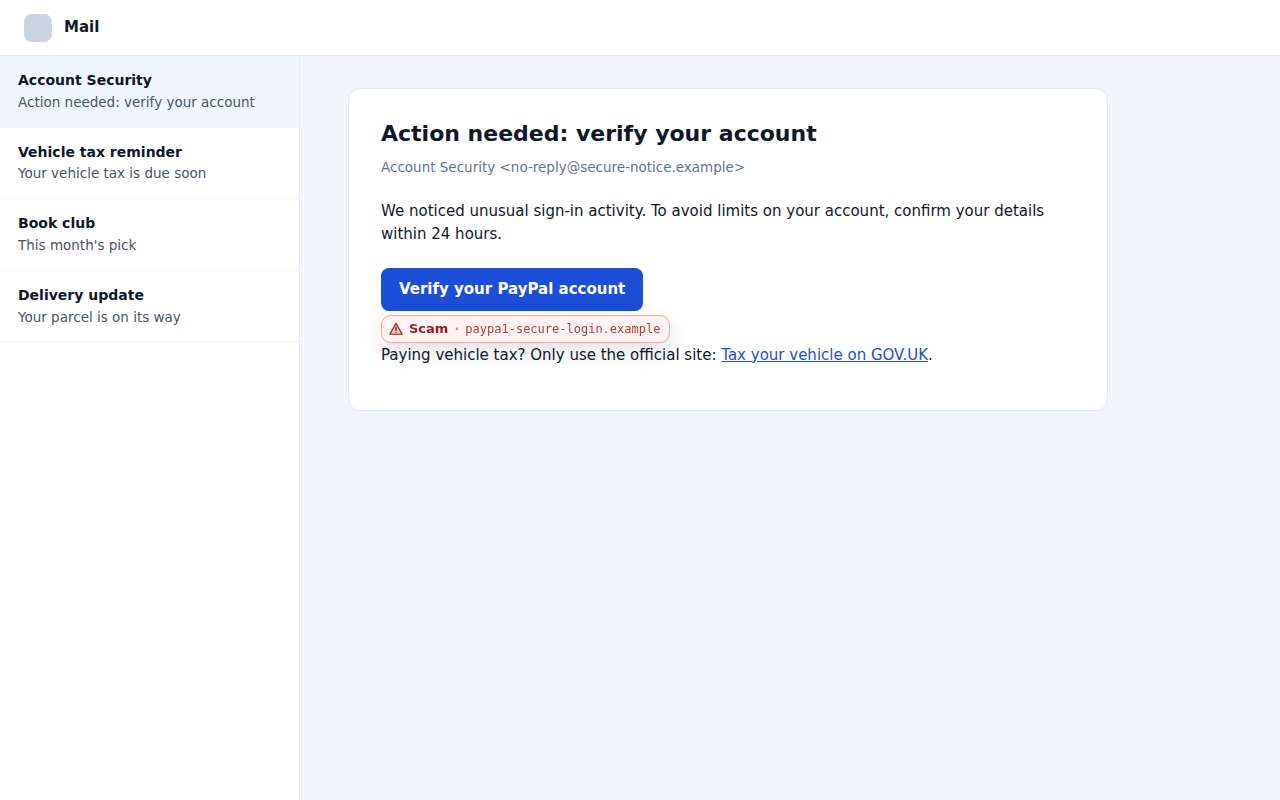
A fake PayPal button gets a red Scam tag and shows the look-alike address. Full size: 1280 × 800 PNG
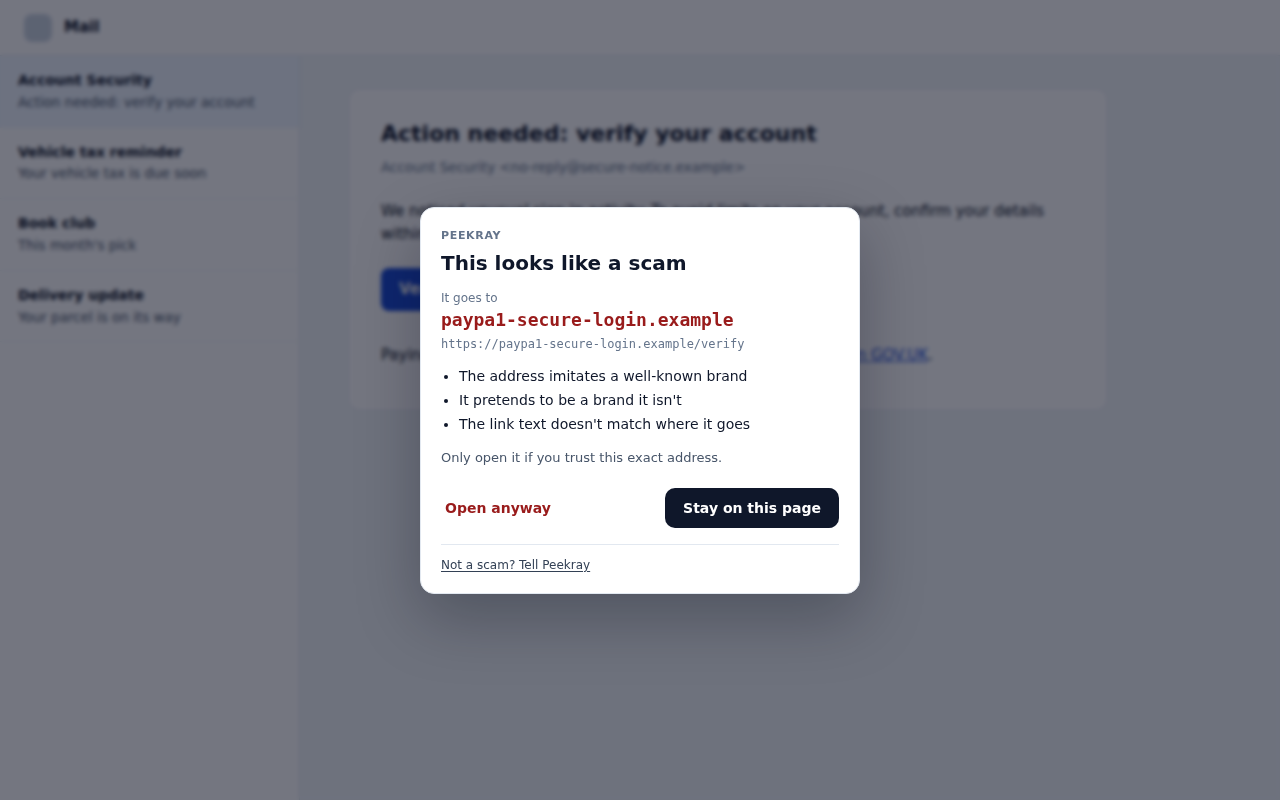
Click a likely scam and Peekray asks before opening it, with the reasons. Full size: 1280 × 800 PNG
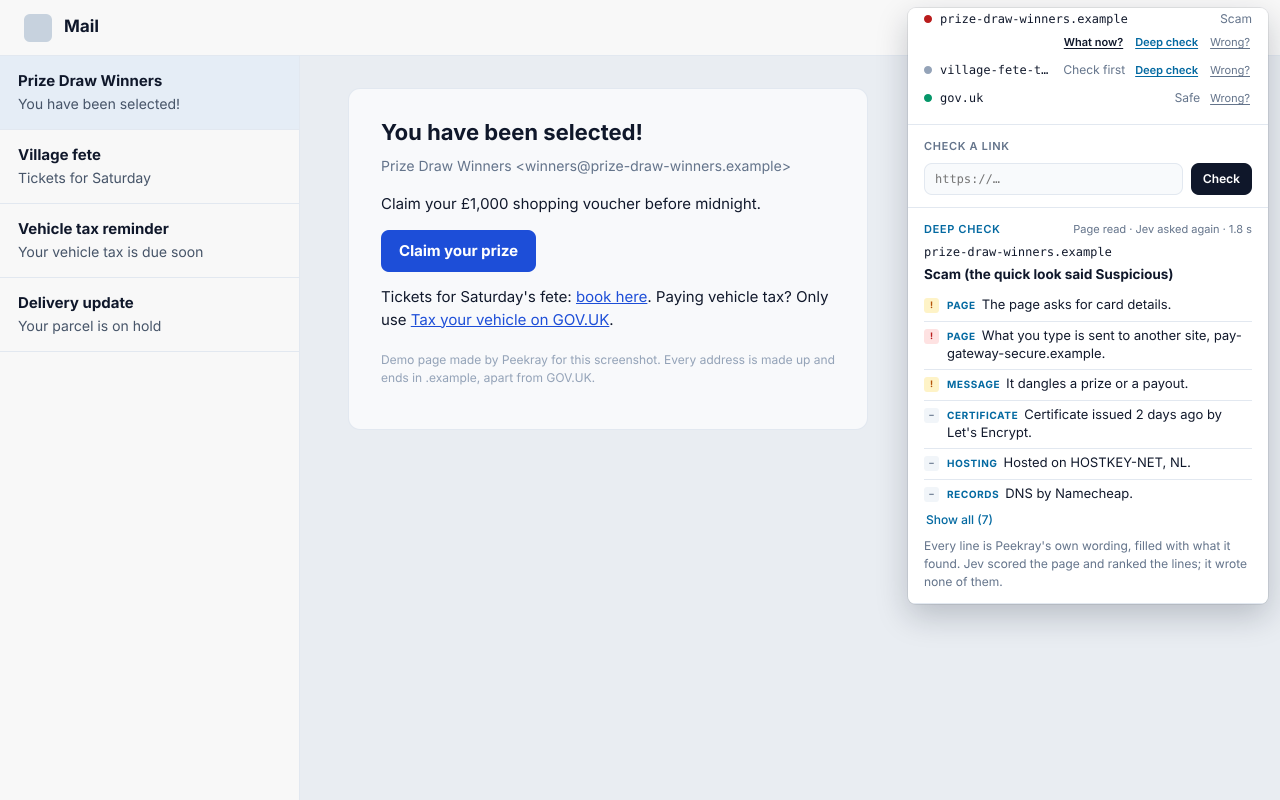
In the toolbar popup, a deep check reads the page a link lands on and labels every reason. Full size: 1280 × 800 PNG
 Logo (SVG)
 Logo for dark backgrounds (SVG)
 Mark only (SVG)
 Mark for dark backgrounds (SVG)
 Square logo, 300 px (PNG)
The emails in the screenshots are demos: every address is made up, apart from GOV.UK. You’re welcome to use these pictures and logos when you write about Peekray.
Where to find it
- Website: peekray.com
- Phone page: peekray.com/share, for checking a message on a phone
- Chrome Web Store: listed as “Peekray: Scam Link Checker – Shows Where a Link Really Goes”
- Microsoft Edge Add-ons: listed as “Peekray: Scam Link Checker”
- SaaSHub: Peekray’s software directory listing
- LaunchFree: Peekray’s launch listing
- Product Hunt: where Peekray launched on 17 November 2026
- How I built a scam link checker on Jev (dev.to): its maker’s write-up of how Peekray works
- Demo video (YouTube): Peekray checking links in a browser and on a phone
The name
Peekray, the scam link checker at peekray.com, was called LinkGuard until October 2026, and its old address (linkguard-one.vercel.app) forwards here. Its only Chrome Web Store listing is “Peekray: Scam Link Checker – Shows Where a Link Really Goes” (ID bmiolholodlhbdfecjihpkencpccknjp), and its Microsoft Edge Add-ons listing is “Peekray: Scam Link Checker” (ID chndgfnehpbkmdolpbkbmjeffmlmkaoo). It isn’t related to the PeekRay X-ray resource pack for Minecraft, to Piqray (alpelisib), a breast cancer medicine, or to the other browser extensions and products called LinkGuard.
Who to ask
Questions, an interview, a quote, or a correction to a list? Email hello@peekray.com and the maker will answer.
More to read: guides to everyday scams.